
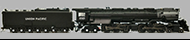
 Equipped with ESU "FULL THROTTLE STEAM" features!
 MUST use LokProgrammer Version 4.5.1 or newer.
The name Challenger was given to steam locomotives with a 4-6-6-4 wheel arrangement. This means that they have four wheels in the leading "pilot" truck, which helps guide the locomotive into curves; two sets of six "driving" wheels, and finally, four "trailing" wheels, which support the rear of the engine and its massive firebox. Each set of driving wheels has its own steam cylinder. In essence, the result is two engines under one boiler.
The frame of the locomotive is "articulated," or hinged, to allow it to go through curves. When watching the approaching locomotive go through a curve, you can see the boiler swing out left or right independently of the lower half of the engine, as the rear half of the locomotive remains in a straight direction until its wheels and frame are halfway through the curve.
The Challengers were designed for fast freight service, but occasionally pulled passenger trains.
While having slightly different boiler pressures (Challengers 280lbs - Big Boys 300lbs) This file could be used for the UP Big Boy 4-8-8-4 locomotives as well as the sounds would be almost the same.
The ESU Full Throttle Steam files now include a few new logic features for added operational realism while still leaving you in control of HOW you wish to run your locomotive.
Heavy Load: F9 by default.
Similar to the “Drive Hold” button on the Full Throttle Diesel files “Heavy Load” allows you to adjust the “Steam Cut Off Valve” at any speed allowing for a fierce full chuff or drifting with snifters and rod clanks. Heavy load can also act as an offset allowing speed adjustments when engaged if desired.
Coast: F4 by default.
Opposite of “Heavy Load” Coast allows for a negative offset allow drifting sounds of Rods and snifter valves at any speed. You again have the option to hold the speed to adjust the speed with this offset active. Even allowing for an increase of speed with no chuffs as if drifting downhill.
Grade Crossing: Sequence. F22 by default.
Allowing 1 button push to play a “pre made” grade crossing cycles with variable lengths and whistle play.
Independent brake: F10 by default
Identical to the Full Throttle Diesel files this is a custom feature created by using logic inside sound slot 11. This allows for the locomotive to stop more quickly than its regular momentum would normally carry it. This one is pretty self-explanatory – just press the brake and come to a stop!
Articulation: Sound Slot 2
By adding Sound Slot 2 to the F8 Function Mapping you can add a second set of drivers making any ESU Steam File articulated.
Function Mappable Air Horn: F21 by default
Sound Slot 21.
Many Steam locomotives had a single chime airhorn equipped. Those modelling SP, MILW, and others can now have this feature and put it where they would like in the function mapping in addition to the whistle.
As with all SELECT decoders there are multiple, bells included on this one sound profile! All changeable using CV48.
For more info please see the "Full Throttle Steam" Quick Start Guide in the ESU Instruction Manual Section of our Website.
http://www.esu.eu/en/downloads/instruction-manuals/digital-decoders/